SHA1 hash:
- f4ec358ae772d954b661dc9c7f5e4940a2c733e2
Description
Trojan.ChimeraWire.2 is a trojan application written in the Go programming language and targeting computers running Microsoft Windows. It uses the functionality of the open-source projects zlsgo and Rod for automated website and web application management. This malware can take screenshots and collect data from webpages displayed on the client side, automatically filling out web forms and performing clicks on webpages. The main task of the analyzed Trojan.ChimeraWire.2 variant is to simulate users visiting sites as well as to boost search results and search statistics for Internet resources.
Operating routine
Trojan.ChimeraWire.2 uses the address hxxps[:]//registry.npmmirror[.]com/-/binary/chromium-browser-snapshots to download chrome-win.zip, the archive containing the Google Chrome browser, to the infected computer. Next, it tries to install the extensions NopeCHA and Buster in the browser. These extensions are designed to automatically solve CAPTCHA tests. For this, the trojan uses the command –headless –load-extension.
To execute the main malicious functionality, Trojan.ChimeraWire.2 launches the Chrome browser via the command interpreter cmd.exe with the parameter –headless (the windowless mode) and the following arguments: remote-debugging-port, --use-mock-keychain, --user-data-dir. After this, a connection is established to the automatically selected debug port via the WebSocket protocol.
Possible arguments when launching the browser are subsequently listed in the method github_com_go_rod_rod_lib_launcher_New, which is called from github_com_zlsgo_browser__ptr_Browser_init:
- headless — launch the browser without the graphical interface (without a window);
- no-startup-window — do not open the window upon startup even if there is no argument headless;
- disable-background-networking — disable background network requests (updates, component downloads);
- disable-backgrounding-occluded-windows — occluded windows will not be put in background mode;
- disable-breakpad — disable the crash reporting mechanism;
- disable-client-side-phishing-detection — disable built-in phishing protection;
- disable-component-extensions-with-background-pages — do not load the browser’s system extensions with background pages;
- disable-default-apps — disable default Chrome apps;
- disable-hang-monitor — disable the browser’s hanging control mechanism;
- disable-ipc-flooding-protection — disable protection from flood attacks between Chrome processes;
- disable-popup-blocking — disable pop-up window blocking;
- disable-prompt-on-repost — do not show the warning when resending the form;
- disable-renderer-backgrounding — do not move tabs to the background to save resources;
- disable-site-isolation-trials — disable the website’s isolation security experiments;
- enable-automation — enable the automation mode;
- metrics-recording-only — collect metrics, but do not send them;
- use-mock-keychain — use the keychain imitation (for macOS);
- user-data-dir — specify the folder containing the user profile;
- remote-debugging-port — enable remote debugging via the specified port;
- site-per-process — enable strict process isolation based on the website (Site Isolation);
- disable-features — disable the specified browser features;
- enable-features — enable the specified browser features;
- no-sandbox — disable the sandbox for Chrome processes.
Obtaining the configuration
The base64 string aHR0cHM6Ly9naXQudGVtcC14eS5jb20 is decoded in the method main_init_2. The trojan obtains the C2 server address git[.]temp-xy[.]com from this string.
Next, via the function app_internal_module_rpa_init_func4_2_2, Trojan.ChimeraWire.2 sends a POST request to this server via the HTTP protocol to obtain the encoded data. The following User-Agent is used in this request:
Mozilla/5.0 (Windows NT 10.0; Win64; x64) AppleWebKit/537.36 (KHTML, like Geck0) Chrome/99.0.0.0 Safari/537.1In response, the C2 server returns a base64 string. The decoded string contains a configuration in the JSON format, which is encrypted with the AES-GCM algorithm.
The trojan uses the key JRBicvy1Tx/3gpSxWByIxyWBSModOR0V to decrypt it. The one-time code Nonce occupies the first 12 bytes of the data, while the authentication tag tag occupies the last 16 bytes of the data.
The code for decrypting the configuration:
import base64
from Crypto.Cipher import AES

with open("response.bin", "r") as f:
    decoded_bytes = base64.b64decode(f.read())

key = 'JRBicvy1Tx/3gpSxWByIxyWBSModOR0V'
cipher = AES.new(key.encode('utf-8'), AES.MODE_GCM, nonce=decoded_bytes[:12])

try:
    decrypted = cipher.decrypt_and_verify(decoded_bytes[12:-16], decoded_bytes[-16:])

    with open("decrypted_response.bin", "wb") as f:
        f.write(decrypted)
except Exception as e:
    print(str(e))
The configuration after decryption:
[{"动作":"等待","说明":"等待 5000-20000 秒","等待时间":"1-5"},{"动作":"google","关键字":["plus size swimwear","plus size dresses","plus size bathing suits","plus size swimsuits"],"最多翻页次数":10,"每页随机点击":["1:90","2:10"],"链接等待时间":["380","500"],"匹配链接":["*bloomchic[.]com/*"]},{"动作":"google","关键字":["Semi Auto Hot Foil Stamping Machine","hot stamping machine","automatic silk screen press","best silk screen machine"],"最多翻页次数":10,"每页随机点击":["1:60","2:40"],"链接等待时间":["360","510"],"匹配链接":["*[.]cn-superfine[.]com/*"]},{"动作":"google","关键字":["plus size summer dresses","plus size swim","plus size women's clothing","plus size clothes","plus size swimwear for women"],"最多翻页次数":10,"每页随机点击":["1:60","2:40"],"链接等待时间":["390","530"],"匹配链接":["*bloomchic[.]com/*"]},{"动作":"google","关键字":["silk screen printing machine automatic","cosmetics printing machines","hot foil stamping equipment"],"最多翻页次数":10,"每页随机点击":["2:70","3:30"],"链接等待时间":["330","500"],"匹配链接":["*www[.]cn-superfine[.]com/*"]},{"动作":"google","关键字":["low cost business ideas","low risk business ideas","low cost business opportunities","low risk businesses","low cost business to start","low-cost business ideas with high","business low cost"],"最多翻页次数":10,"每页随机点击":["0:90","1:10"],"链接等待时间":["320","600"],"匹配链接":["*businessideashunter[.]com/*"]},{"动作":"等待","说明":"随机待 10000 - 60000 秒","等待时间":"480,1400"}]The same configuration, translated into English:
[{"action":"wait","illustrate":"wait 5000-20000 Second","Waiting time":"1-5"},{"action":"google","Keywords":["plus size swimwear","plus size dresses","plus size bathing suits","plus size swimsuits"],"Maximum number of page turns":10,"Random clicks per page":["1:90","2:10"],"Link wait time":["380","500"],"Matching Links":["*bloomchic[.]com/*"]},{"action":"google","Keywords":["Semi Auto Hot Foil Stamping Machine","hot stamping machine","automatic silk screen press","best silk screen machine"],"Maximum number of page turns":10,"Random clicks per page":["1:60","2:40"],"Link wait time":["360","510"],"Matching Links":["*[.]cn-superfine[.]com/*"]},{"action":"google","Keywords":["plus size summer dresses","plus size swim","plus size women's clothing","plus size clothes","plus size swimwear for women"],"Maximum number of page turns":10,"Random clicks per page":["1:60","2:40"],"Link wait time":["390","530"],"Matching Links":["*bloomchic[.]com/*"]},{"action":"google","Keywords":["silk screen printing machine automatic","cosmetics printing machines","hot foil stamping equipment"],"Maximum number of page turns":10,"Random clicks per page":["2:70","3:30"],"Link wait time":["330","500"],"Matching Links":["*www[.]cn-superfine[.]com/*"]},{"action":"google","Keywords":["low cost business ideas","low risk business ideas","low cost business opportunities","low risk businesses","low cost business to start","low-cost business ideas with high","business low cost"],"Maximum number of page turns":10,"Random clicks per page":["0:90","1:10"],"Link wait time":["320","600"],"Matching Links":["*businessideashunter[.]com/*"]},{"action":"wait","illustrate":"Random Wait 10000 - 60000 Second","Waiting time":"480,1400"}]The obtained configuration contains tasks and the parameters related to them:
- the target search engine (Google and Bing are supported);
- the key phrases for searching the websites in a given search engine and for their subsequent loading;
- the maximum number of sequential transitions between webpages;
- random distributions for performing automated clicks on webpages;
- the wait time for loading pages;
- the target domains.
To more effectively simulate the activity of a real user and bypass systems that monitor constant activity, the configuration also includes parameters responsible for pauses between work sessions.
The clicker functionality
Trojan.ChimeraWire.2 can perform these types of clicks:
- for navigating search results;
- for opening the discovered relevant URLs in new background tabs.
Based on the settings from the received JSON, the malware uses the key phrases and the specified domains to search websites via the specified search engine. The methods app_internal_module_rpa_InlayGoogle and app_internal_module_rpa_SearchGoogleAction are used to operate with the Google search engine. The methods app_internal_module_rpa_InlayBing and app_internal_module_rpa_SearchWebAction are used to operate with the Bing search engine.
The function app_internal_module_rpa__ptr_SearchWebType_runMatchLinks is used for managing the found links.
The function app_internal_module_rpa_handleGoogleCaptcha is used to solve the CAPTCHA from the Google search engine.
The trojan opens the target links from the search results and performs clicks on the loaded webpages.
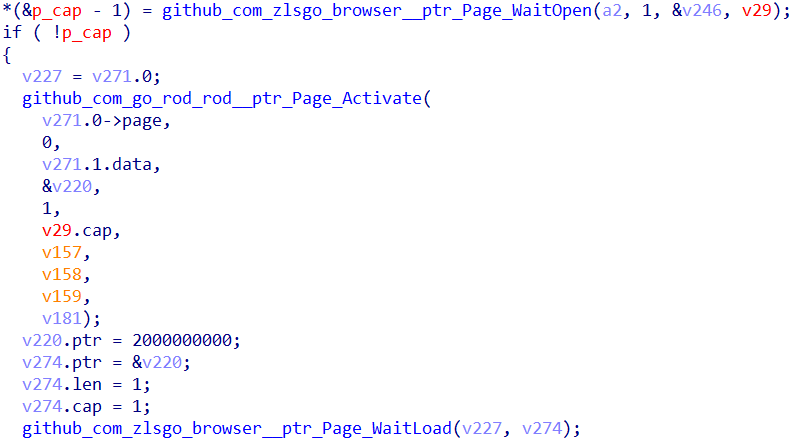
An example of opening a page, using functionality from the projects zlsgo and Rod
When the page is being loaded, several functions are subsequently called:
- github_com_zlsgo_browser__ptr_Page_WaitOpen — waiting for the page to fully load;
- github_com_go_rod_rod__ptr_Page_Activate — activating the browser tab;
- github_com_zlsgo_browser__ptr_Page_WaitLoad — waiting for loading with a 2-second timeout.
These functions are also called:
- github_com_zlsgo_browser__ptr_Element_Element — searching the hyperlink HTML element by the tag <a>;
- github_com_zlsgo_browser__ptr_Element_Property — obtaining the value from href.
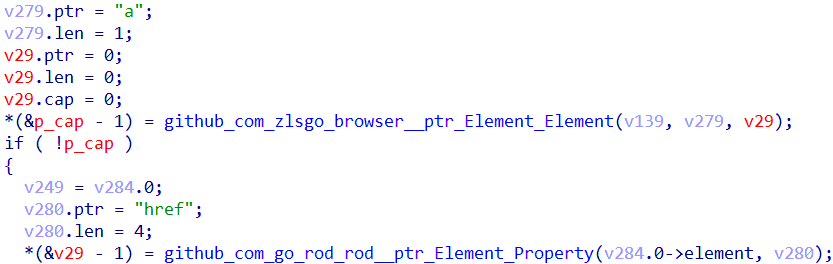
Searching the hyperlink HTML element by the tag <a> and reading the value from href
Trojan.ChimeraWire.2 puts all of the found elements into a data array and shuffles it so that the objects in it are in a different order than the order on the webpage.
Next, to determine the URL structure, the value href is extracted from the selector <a href> of every element. After that, Trojan.ChimeraWire.2 checks whether the resulting links start with valid schemes like http and https. If a link does not pass verification, the method returns an error.
Next, the trojan checks whether the obtained links match the target web addresses from the configuration and calculates the number of matches. Depending on this number, the trojan then uses different operating algorithms.
If the page contains matches to the dictionary, and their number is sufficient, a context-deterministic algorithm is used. Trojan.ChimeraWire.2 scans the loaded page and sorts detected links by their relevance (the URLs that best match the keywords are listed first). After that, a click on one or several suitable links is performed.
If the page does not have enough matches or has none, an algorithm containing a probabilistic behavior model, which imitates real human behavior as closely as possible, is used. Using the parameters from the configuration and the weighted distribution (the method WeightedRand), Trojan.ChimeraWire.2 determines the number of links to be opened. For example, the distribution ["1:90", "2:10"] means that the trojan will click 1 link with a probability of 90%, and 2 links with a probability of 20%. As a result, there is a high probability that it will click 1 link. The trojan randomly (via the method RandPickN) selects a link from the data array created earlier and performs a click.
Every time Trojan.ChimeraWire.2 opens a link from the search results and performs clicks on the loaded page, the malware either returns to the previous tab or moves to the next one, depending on the task. The algorithm of actions is repeated until the click limit for target websites is exhausted.
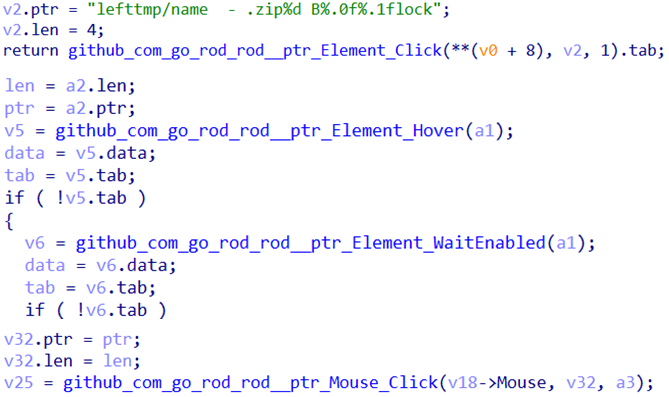
The functionality responsible for managing clicks
Examples of calls for the main functions used to perform clicks:
- github_com_go_rod_rod__ptr_Element_Click — the main function for simulating clicks;
- github_com_go_rod_rod__ptr_Element_Hover — the function for hovering the cursor over target element;
- github_com_go_rod_rod__ptr_Element_WaitEnabled — the function for waiting while the element becomes active and available for a click;
- github_com_go_rod_rod__ptr_Mouse_Click — the function for performing a mouse click on the element, based on its coordinates.
