Packer: WinLicense
SHA1:
- 73ba54f9272468fbec8b1d0920b3284a197b3915 (davapi.dll, x86)
- d6f2a7f09d406b4f239efb2d9334551f16b4de16 (davapi.dll, x64)
Description
Trojan.Belonard.6 is part of the Belonard trojan. The original names are kernel32.dll (x86) and kernel.dll (x64). The malicious library has one exported function, “x”, which takes a pointer as an argument to the SERVICE_STATUS service’s structure, in which WinDHCP.dll is running. Trojan.Belonard.6 is created by Mssv16.asi (Trojan.Belonard.3). It downloads and runs wmcodecs.dll (Trojan.Belonard.8), ssdp32.dll (Trojan.Belonard.9) and davapi.dll (Trojan.Belonard.6).
Operating routine
Preparation
Before the startup of all functions, Trojan.Belonard.6 checks the “Tag” and “Data” parameters in the WinDHCP service registry. The “Data” parameter must contain an array of bytes used to generate the AES key. If there is none, the trojan uses the OpenSSL library to generate 32 random bytes, which are later used to initialize the AES-CFB. After that, the trojan reads the “Info” and “Scheme” parameters of the WinDHCP service. In “Scheme”, the trojan stores 4 parameters encrypted with AES. “Info” stores the SHA256 hash from the list of installed programs.
The trojan loads the wmcodecs.dll library and calls its exported function “y”. As an argument, it passes a pointer initialized by another pointer leading to the container that holds information about files and corresponding SHA256 hashes inside. The name of the library is encrypted.
Decryption algorithm:
s = ''
c = ord(d[0])
for i in range(len(d)-1):
    c = (ord(d[i+1]) + 0xe1*c - ord(d[i])*0x19  - 0x0b) & 0xff
    s += chr(c)
The trojan decrypts the name of the C&C server, oihcyenw.valve-ms[.]ru, and launches three functions with randomly selected time lapses:
- Search for running Counter-Strike clients; Time between launches—from 30 to 90 seconds.
- Launches of ssdp32.dll—from 30 to 90 seconds.
- Requests to the command and control server—every 2-3 hours.
Periods can be changed at the command of the C&C server. Once each second, the trojan also writes the parameters of the WinDHCP service in the registry.
Search for running Counter-Strike clients
This function launches only if wmcodecs.dll is present. In order to find the Counter-Strike process, it parses through all active processes. It then searches for the files and folders related to the Counter-Strike 1.6 game client in the executed file directory.
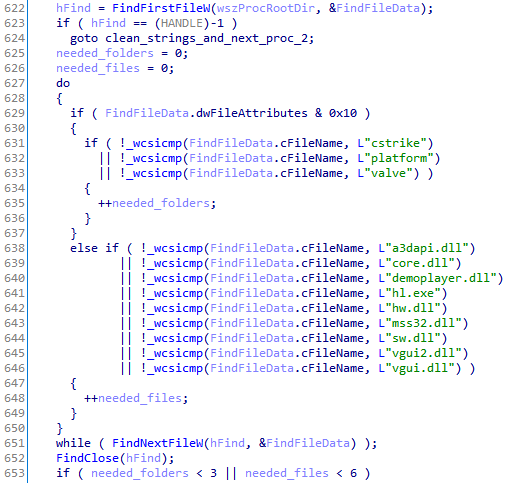
The trojan can also identify an official client. In order to do that, it checks if the path to the executed process file ends with steamapps\common\Half-Life. It also checks if the Steam.dll file is present in the relative directory mentioned above.
Upon detecting a Counter-Strike client, it checks the client’s files and their corresponding SHA-256 hashes against the list with the information received from the wmcodecs.dll’s exported function “y”. If a discrepancy exists, the trojan calls the wmcodecs.dll’s exported function “x”, passing it through a path to the executed file process as an argument.
Launching of ssdp32.dll
If the %WINDIR%\System32 directory has an ssdp32.dll file in it, the trojan parses all the processes in which the rundll32.exe is the executed file. If the “ssdp32.dll” module is on the list of downloaded processes’ modules, the trojan ends that process. Upon finishing the parsing of all the processes, it launches the ssdp32.dll’s exported function “x” through rundll32.exe.
Requests to the command and control server
The trojan gathers the following information about the system:
#pragma pack(push,1)
struct st_info
{
  _DWORD dword0;  // 0x05
  _BYTE byte4;  // 0x00
  _DWORD svc_dhcp_scheme_wmcodecs_ver;
  _BYTE bIsWmcodecsDllLoaded;
  _DWORD dwProductVersionMS;
  _WORD ProductVersionLS; // (dwProductVersionLS & 0xffff0000) >> 16
  _WORD DefaultUILang;
  _DWORD TotalMemory; // in Mb
  _DWORD dwNumberOfProcessors;
  _WORD wProcessorArchitecture;
  _WORD wProcessorLevel;
  _WORD wProcessorRevision;
  _QWORD ticks;
}
#pragma pack(pop)
The trojan then compiles a list of installed programs and saves the SHA256 hash from that list in the “Info” parameter of the “WinDHCP” service. When it’s done, the trojan archives the list into an XZ archive and forms an st_packet structure:
struct st_packet
{
  st_info info;
  _BYTE svc_dhcp_data[0x20];
  _DWORD svc_dhcp_scheme_dword0;
  _DWORD installed_programs_length;
  _BYTE aeskey2[0x20];  // absent if size of resulting st_packet structure is less than 342 bytes
  _BYTE aeskey1[0x20];
  _BYTE installed_programs_sha256[0x20];
  _BYTE byte1; // 0x01
  _DWORD xz_arc_size;
  char xz_arc_data[size];
  _BYTE byte2; // 0x02
  _BYTE bSsdp32DllExists; // 0x01 - exists & hash computed, 0xff - doesn't exist, 0xfe - failed to compute sha256 hash
  _BYTE Ssdp32Dll_sha256[0x20]; // absent if bSsdp32DllExists != 0x01
}
The resulting structure is encrypted with a public RSA-key embedded in the trojan. Only the first 342 bytes will be encrypted by the RSA. The rest (if present) will be encrypted by the AES in a CFB mode with a block size of 128 bits and the key taken from the st_packet->aeskey2 by making a call to EVP_BytesToKey(cipher, md_sha256, 0, &st_packet->aeskey2, 32, 5, key, iv). Then, after a zero byte is added to the beginning of the packet, the data is sent to the C&C server.
The trojan firstly attempts to connect with one of the servers it knows. If none respond, the trojan uses the domain generation algorithm embedded in it, and tries to connect with one of the created domain names.
After the decrypted data is sent to the server, the trojan receives data in response. The decryption is performed with AES in a CFB mode with a block size of 128 bits. The key is created with st_packet->aeskey1. The first 36 bytes of data are decrypted first, including the last DWORD value that shows the actual payload with the header. The DWORD value adds to the AES key and is hashed using SHA256. The resulting hash must match the first 32 decrypted bytes. The remaining received data is decrypted only after this. The first 32 bytes are a SHA256 hash of the st_packet->aeskey1 and the subsequent data. It successively analyzes the buffer, which can contain more than one command at the same time.
| id | Struct | desc |
|---|---|---|
| 0x00 | struct st_cmd0 { _BYTE opcode; // 0x00 _DWORD size; _BYTE payload[size]; } | davapi.dll or spwinres.dll, depending on value in the “tag" parameter of the WinDHCP service. |
| 0x01 | struct st_cmd0 { _BYTE opcode; // 0x01 _DWORD size; _BYTE payload[size]; } | XZ archive containing the wmcodecs.dll. |
| 0x02 | struct st_cmd2 { _BYTE opcode; // 0x02 _DWORD callhome_period_low; _DWORD callhome_period_high; _DWORD callhome_connect_attempts_max; _DWORD callhome_dga_period_low; _DWORD callhome_dga_period_high; _DWORD findcsclients_period_low; _DWORD findcsclients_period_high; _DWORD main_loop_step; _DWORD runssdp32dll_period_low; _DWORD runssdp32dll_period_high; _DWORD ssdp32_proc_instances; _DWORD ssdp32_proc_pause; _DWORD ssdp32_proc_postkill_pause; }; | Parameters of the trojan: |
| 0x03 | struct st_cmd3 { _BYTE opcode; // 0x03 _DWORD size; _BYTE payload[size]; } | ssdp32.dll |
The buffer can contain one or several structures but only one of each type.
After that, the trojan parses all the processes in which the rundll32.exe file is executed and stops those that have the ssdp32.dll module in their lists of launched modules. It then saves the modules that were sent by the server (if there were any) in the %WINDIR%\System32\ directory and sets the created/modified/accessed dates to that of kernel32.dll for them.
